
Welcome to the virteos Top Partners Community!
The best thing to do is just start discovering this platform for professional exchange. We have put together a brief overview for you to get started:
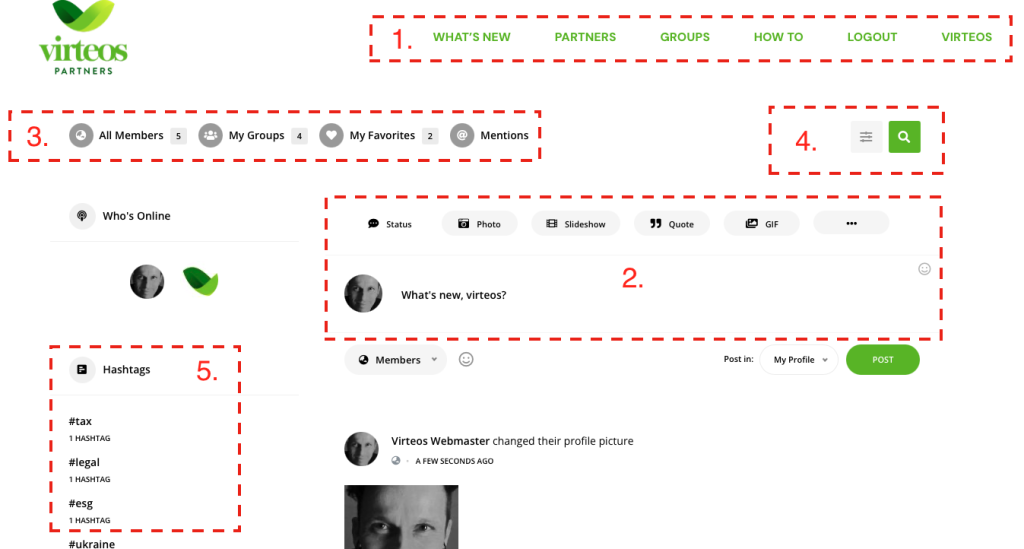
The main menu: In your desktop web browser, you will see the menu as shown in the image below. In the mobile version on your smartphone, the same menu is simply hidden on the right at the top of the screen under the three bars and pops up when you tap on it.
- What’s New: This takes you to the main view, the News Feed. All activities except those in closed groups are listed here continuously. Just try to change the picture or cover image of your profile and it will be displayed here.
- Partners: Here you will find all participants of the community and you can look through the profiles one by one. Tip: the more information your own profile contains, the better other participants of the community can communicate with you.
- Groups: You can find groups created by topic here. Join public groups to post, comment, just drop in and invite other participants to share interesting things. You can join closed groups by invitation only.
- How To: Here you are reading the quick start guide.
- Log Out: Here you leave the community – even if you are logged out, you will receive messages about news from the community by email. Tip: In your profile settings under „Notifications“ you can set which news you want to receive messages about.
- virteos: This is the fastest way to the website of virteos Vanas & Partner
The elements of the main „What’s New“ page:
- The main menu, which we introduced to you in detail in the previous paragraph.
- Here you can start posting right away – everyone is happy about a „Welcome“ message and you can attach links, photos, videos or documents. When you post a message, you can determine in the bottom right corner whether it will show up in your profile or specifically in one of the groups you are already a member of. Messages cannot be changed afterwards, but they can be deleted and rewritten. You can also pin an interesting message from other participants in the feed for all to see at the top or bookmark it for yourself and quickly find it again under the bookmarks in your profile.
- Here you can quickly go to all profiles, your groups, posts you have favorited with a heart and mentions. You can also like posts of other participants with a heart, be mentioned in posts with @name or mention other participants. They will then receive a message directly in the browser and by email.
- Filter, search. Everything in virteos Top Partners is retrievable with simple text search. Also use the bookmark feature to remember interesting posts.
- Hashtags are one of the best ways to get your posts noticed. Use the hashtags of other posts and yours will be found along with them. The simple rule: more hashtags mean more reach.
But now just get started. Click on „Partners“, find your profile and complete it with expertise, education and areas of interest. Upload a profile picture and a cover. These will be displayed as soon as you reload your profile.
Have a good communication with virteos Top Partners!